Configurable Data Group
A "Configurable Data Group" provides a flexible way to create register-based data groups on a per-device basis by using the remote device editor. You can use such data groups in one-off scenarios like testing or, if the data group definition is more broadly useful, paste its XML into the applicable device template file. You may add and configure up to 999 of these data groups per remote device.
Best practice recommends first writing a thorough device template file to accommodate as many of your field devices as possible. Then use a remote device editor to add one or more "Configurable Data Group(s)" on an ad hoc basis to suit unique situations.
For more information, see the following subsections:
- To Define a Configurable Data Group
- To Define a Configurable Data Group Element
- To Define a Configurable Block
- Configurable Modbus Data Group Definition Properties
- Data Group Element Definition Properties
- Block Definition Properties
You might find the CygNet DDS Data Group Copy Utility useful for copying a unique "Configurable Data Group" to other remote devices. You might find the Device Copy Utility useful for copying remote devices that use the "Configurable Data Group(s)."
To Define a Configurable Data Group
- Using CygNet Explorer, open the Device Definition Service (DDS), select the Remote Devices page, and open the remote device to which you want to add a "Configurable Data Group."
- In the remote device Properties editor, click the Data Group tab, click Add, and double-click Configurable Modbus Data Group.
- Define general data group properties, then click Configure. (Ord# is only used as a data group identifier; it has no special uses beyond identifying an instance of a "Configurable Data Group").
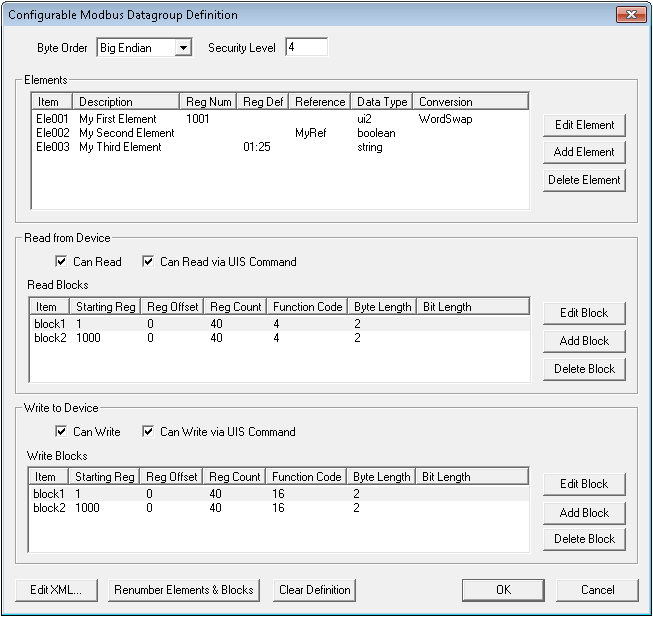
- In the Configurable Data Group Definition dialog box that opens, specify the Byte Order and other "Configurable Data Group" settings. See Configurable Modbus Data Group Definition Properties.
- Click Add Element to add a new element to your "Configurable Data Group."
- Highlight the new element and click Edit Element to define the new element.
- In the applicable Read from Device or Write to Device fields, define blocks. Click Add Block to add a new block to your "Configurable Data Group."
- Highlight the new block and click Edit Block to define the new block. Your finished "Configurable Data Group" might look something like this:
- If you define the data group and want to add its XML to a device template file, click Edit XML and paste the data group XML into the applicable device template file.
- If you've deleted elements and/or blocks in the process of creating the data group and want to reorder the existing elements and/or blocks in sequential order, click Renumber Elements & Blocks. (If you've given an element a custom name, clicking Renumber Elements will overwrite the name.)
- When you are finished, click OK.
To Define a Configurable Data Group Element
- At the Configurable Modbus Data Group Definition dialog box, click Add Element. Add as many data group elements as your "Configurable Data Group" requires.
- Highlight the data group element you want to define and click Edit Element. A dialog box like the following appears:
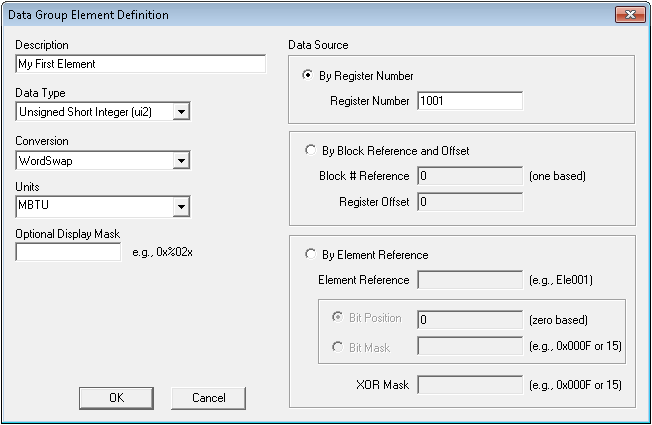
- Specify the Data Type and other "Configurable Data Group" data group element settings. See Data Group Data Group Element Definition Properties.
- When you are finished, click OK. Repeat steps 1 - 3 until you've added all required data group elements.
To Define a Configurable Block
- At the Configurable Modbus Data Group Definition dialog box, click Add Block. Add as many read and/or write blocks as your "Configurable Modbus Data Group" requires.
- Highlight the block you want to define and click Edit Block. A dialog box like the following appears:

- Specify the Starting Register Number and other "Configurable Data Group" block settings. See Block Definition Properties.
- When you are finished, click OK. Repeat steps 1 - 3 until you've added all required data group elements.
Configurable Modbus Data Group Definition Properties
The following table lists and describes the properties of the Configurable Data Group Definition dialog box.
| Item | Description |
|---|---|
|
Add Block |
Click Add Block to add a new block. If another block is currently highlighted, the added block is a copy of the highlighted block. See block. |
|
Add Element |
Click Add Element to add a new element. If another element is currently highlighted, the added element is a copy of the highlighted element. See DataGroupElement. |
|
Bit Length |
See regBitLen. |
|
Byte Length |
See regByteLen. |
|
Byte Order |
Options are:
See byteOrder. |
|
Can Read |
See canRecv. |
|
Can Read via UIS Command |
See uccRecv. |
|
Can Write |
See canSend. |
|
Can Write via UIS Command |
See uccSend. |
|
Clear Definition |
Click to clear the entire data group definition. |
|
Conversion |
Options are:
See cvtF. |
|
Data Type |
See type. |
|
Delete Block |
Click to delete a selected block. |
|
Delete Element |
Click to delete a selected element. |
|
Description |
See desc. |
|
Edit Block |
Click to edit the selected block. |
|
Edit Element |
Click to edit the selected element. |
|
Edit XML |
Click to open your "Configurable Data Group Definition" in an XML editor. Make changes if required. This is useful for fine-tuning your configurable data group definition or for copying and pasting the data group definition into a device template file. |
|
Function Code |
See funcCode. |
|
Item |
The name of an element or block. The element name can be modified in the XML file; the block name cannot. See DataGroupElement. |
|
Reference |
See ref. |
|
Reg Count |
See regCnt. |
|
Reg Def |
See regDef. |
|
Reg Num |
See regNum. |
|
Reg Offset |
See regOff. |
|
Renumber Elements and Blocks |
Click to reset the numbering of your elements and blocks to a simple consecutive format. This is useful if you've deleted elements or blocks and want the data group elements and blocks to be more tightly ordered. But clicking Renumber Elements and Blocks overwrites data group element IDs whose names you have changed in the configurable data group's XML definition. |
|
Security Level |
See secLev. |
|
Starting Reg |
See regNum. |
Data Group Element Definition Properties
The following table lists and describes the properties of the Data Group Element Definition dialog box.
| Item | Description |
|---|---|
|
Bit Mask |
See bMask. |
|
Bit Position |
See bPos. |
|
Block # Reference |
See regDef. |
|
By Block Reference and Offset |
See regDef. |
|
By Element Reference |
See ref. |
|
By Register Number |
See regNum. |
|
Conversion |
Options are:
See cvtF. |
|
Data Type |
See type. |
|
Description |
See desc. |
|
Element Reference |
See ref. |
|
Optional Display Mask |
See dMask. |
|
Register Number |
See regNum. |
|
Register Offset |
See regDef. |
|
Units |
See units. |
|
XOR Mask |
See bXorMask. |
Block Definition Properties
The following table lists and describes the properties of the Block Definition dialog box.
| Item | Description |
|---|---|
|
By Bit Length |
See regBitLen. |
|
By Byte Length |
See regByteLen. |
|
Function Code |
See funcCode. |
|
Register Count |
See regCnt. |
|
Register Offset |
See regOff. |
|
Starting Register Number |
See regNum. |


